Delivery SMS Failures: Validate Order Phone Numbers in 2026
Phone-Check.app Team · · 8 min read
A parcel can leave the warehouse while its delivery text goes nowhere. The order record may contain a landline, a mistyped mobile number, or an old contact copied from a previous purchase. Repeating the message spends more without repairing the customer’s details.
Why order update SMS needs its own workflow
Holiday messaging planning often concentrates on promotions. Delivery alerts share the same operational pressure. Twilio’s September 2026 peak-season guidance explicitly includes delivery alerts among traffic affected by heavy network demand. That makes clean order contacts and realistic queue planning relevant before the warehouse reaches its busiest weeks.
A marketing suppression rule and an order-notification rule serve different purposes. Store the purpose, customer preference, and eligibility decision for each. Do not turn a delivery contact into a promotional subscriber automatically. Phone validation describes a destination; your messaging policy determines which communications you may send.
A useful success measure is the share of orders whose necessary updates reach the customer through an approved channel. SMS delivery percentage alone misses people successfully reached by email or support. Give operations staff a clear repair queue so they can fix bad contact details before the next dispatch.
Validate, enrich, filter, and repair order contacts
Phone-Check.app provides the phone-data checks inside this workflow. Its published figures include 99.6% validation accuracy across 232 countries and average single-number responses below 50ms. Measure the complete checkout request in your own environment; DNS, network latency, and downstream systems add time beyond the lookup itself.
Use a helpful correction message when the result is invalid. Show the submitted country and ask the customer to check the number. Preserve the cart and other fields. If a mobile number is optional for fulfillment, let the customer select another supported contact method rather than forcing a false number into the form.
How to validate order phone numbers before delivery SMS
1. Capture the number with country context
Ask for a contact number and an explicit country choice. Preserve the original input and order ID. Explain whether the number is for delivery updates or marketing, and store those communication preferences separately. Avoid guessing the country from an IP address or silently rewriting ambiguous local digits.
2. Validate on your server before scheduling a text
Call the lookup endpoint after the customer submits a complete number. Check the response status and returned validity. Store a normalized number only when supplied, with a validation timestamp. A network timeout creates an unknown result and a retry task; it should not mark the customer’s number invalid.
3. Enrich the order contact and choose a channel
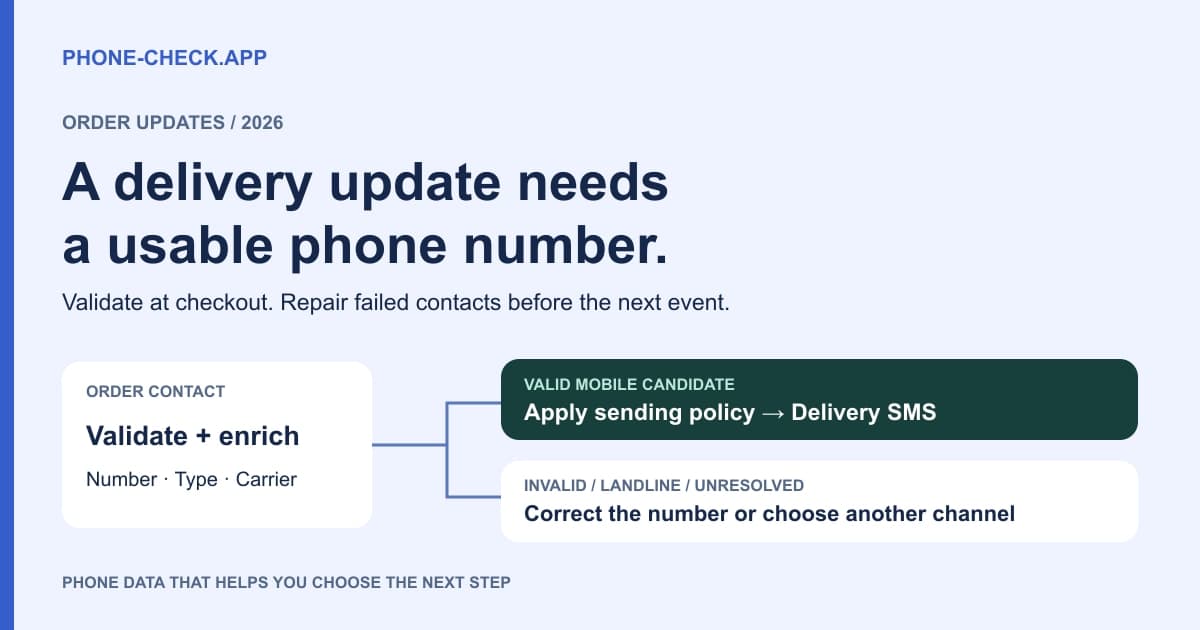
Read line type, carrier, country, disposable flag, and timezones. Route valid mobile candidates to the transactional messaging policy. Hold invalid numbers for correction, and offer another permitted contact channel for landlines or unresolved line types. Keep the order’s payment and fraud decisions separate from its SMS eligibility.
4. Send once for each order event
Assign an idempotency key to the order, event, and recipient so repeated warehouse webhooks cannot trigger repeated texts. Apply your messaging provider’s permission and suppression rules, then submit the message. Record the message ID and the contact version used for the send.
5. Use delivery feedback to repair the next attempt
Process authenticated provider callbacks, distinguish terminal and temporary failures, and cap retries. Request a corrected number through an existing permitted channel when needed. Revalidate changed contacts before the next shipment event and update the CRM so tomorrow’s export does not restore the old number.
Use line type to route delivery notifications
The difference between landline and mobile matters at the channel decision. A valid landline may reach a staffed reception desk by voice while failing as an SMS destination. A B2B order may legitimately use that switchboard. Keep it available to the account team while collecting a suitable delivery contact.
Fixed and non-fixed VoIP describe different service arrangements, but neither label proves a person’s identity or the ability to receive every kind of text. The public Phone-Check.app response documents a type string, not a guaranteed VoIP subtype breakdown. Treat VOIP as the available signal unless your response contract explicitly provides more detail.
| Number category | What it tells you | Practical next step |
|---|---|---|
| Mobile | Candidate for text delivery | Apply permission and sending policy |
| Landline / FIXED_LINE | Voice-oriented destination | Offer another supported update channel |
| Fixed VoIP | Internet calling with location association | Check capability; retain business contacts |
| Non-fixed VoIP | Internet calling without a fixed location tie | Review context; do not assume fraud |
| Invalid / unresolved | Not ready for the SMS route | Correct input or hold for review |
Add a server-side phone verification API check
This TypeScript example calls the documented single-number endpoint. It returns a lookup decision, not permission to send or evidence of ownership. The application should apply the result to the workflow above. Put the API key in a server-side secret and avoid logging raw phone numbers or authentication headers.
The request deliberately treats missing or malformed fields as errors instead of defaulting them to valid. Keep the order available while your application retries a temporary lookup failure within a bounded policy. If you need proof that the customer controls a number, use a separate verification flow; a validity lookup does not prove possession.
async function checkOrderPhone(phone: string, apiKey: string) {
  const url = new URL(
    "https://api.phone-check.app/v1-get-phone-details",
  );
  url.searchParams.set("phone", phone);
  const response = await fetch(url, {
    headers: { "x-api-key": apiKey, accept: "application/json" },
    signal: AbortSignal.timeout(3000),
  });
  if (!response.ok) throw new Error("Phone lookup unavailable");

  const result: unknown = await response.json();
  if (!result || typeof result !== "object" ||
      !("valid" in result) || typeof result.valid !== "boolean") {
    throw new Error("Unexpected phone lookup response");
  }
  if (!result.valid) return "correct-number";
  if (!("type" in result) || typeof result.type !== "string") {
    return "review-channel";
  }
  return result.type === "MOBILE"
    ? "mobile-candidate"
    : "review-channel";
}
Separate bad numbers from temporary delivery failures
A valid result is not a guarantee that a handset is switched on, reachable, or allowed to receive your sender’s messages. Twilio’s error 30003 describes an unreachable handset and can reflect temporary conditions. Its 30005 concerns an unknown destination, while 30006 includes landline or unreachable-carrier cases. Read the provider’s specific diagnosis before choosing a retry.
For a temporary failure, allow a bounded retry if the message is still useful. An out-for-delivery alert that arrives after delivery can confuse the customer. Set an expiry for each event and cancel queued updates when a later event makes them obsolete. Permanent or repeated destination failures should move to contact repair.
The word void is often used loosely for a number that cannot be used. Keep your stored reason precise: invalid lookup, unsupported channel, provider failure, or customer-reported disconnection. Do not translate a single failed SMS into a permanent disconnected status. Live line status requires an explicitly supported source and its own freshness rules.
Group delivery receipts by country, returned carrier, sender, and error category. A spike isolated to one carrier can indicate a route issue; failures across every carrier may point to your sender configuration. Carrier lookup makes those groups useful, but the messaging provider still owns delivery investigation and route changes.
Repair existing customer profiles in bulk
Real-time validation cannot repair every old shipping profile. Export customer IDs and phone fields from your order system, then upload multiple CSV files to the bulk checker. After the jobs finish, inspect validity and line type before syncing results back. Keep a separate review file for records that need a customer response.
The download without landlines removes FIXED_LINE rows. Apply _Valid = Yes separately, and use _Type = MOBILE if your policy only supports mobile SMS. Removing invalid and landline destinations from the notification list prevents repeated attempts; deleting the customer or order would destroy useful history.
Use normalized numbers for matching, but retain the customer ID as the update key. Shared household phones and business switchboards can appear on several legitimate accounts. A changed phone should trigger a fresh check. Keep timestamps on both the source contact and the result so an old CSV cannot overwrite a newer correction.
Set delivery timing and form-abuse controls
Prefer the customer’s stated timezone or the confirmed delivery context when scheduling non-urgent updates. Returned phone timezones can help fill missing data, but they cannot locate a traveling customer. Convert timestamps with IANA timezone rules and daylight-saving support. Handle ambiguous results explicitly rather than assuming every number in a country shares one clock.
Keep transactional copy tied to the order: dispatch status, delivery date, and an appropriate tracking link. Do not infer product preferences from the carrier. For non-urgent summaries, test timing against engagement; for urgent delivery changes, follow the notification policy the customer selected.
Protect checkout and tracking forms that trigger paid texts with request limits, resend caps, and per-order event deduplication. VoIP or disposable-number signals can prompt review alongside order history. They should not automatically cancel a paid order. SMS pumping can also use valid mobile numbers, so keep the sending provider’s fraud controls enabled.
Measure notification quality without inflated ROI
An illustrative operation sends 50,000 notification attempts with a 12% failure rate: 6,000 failures. A later comparable batch at 1.8% has 900 failures, a reduction of 5,100 or 85%. That arithmetic is a planning example, not a reported Phone-Check.app customer result. Record changes in recipients, routes, and retry policy before attributing an improvement to validation.
At an assumed $0.02 per billed attempt, avoiding 5,100 attempts would save $102 before validation costs. Actual savings depend on what the provider bills, including segments and destination fees. Add separately measured support savings only when fewer failed updates really reduce contacts. Compare successful orders reached, checkout completion, and correction rates so strict filters do not hide lost customers.
Frequently asked questions
Should checkout reject every VoIP number?
No. Many legitimate customers and businesses use VoIP. Review channel support and relevant order context, then offer a supported alternative when SMS is unsuitable. A VoIP label alone does not establish payment fraud.
Does valid mean a delivery text will arrive?
No. Validation helps assess the destination, while delivery also depends on handset availability, sender configuration, network conditions, and provider policy. Use delivery receipts and a bounded retry strategy after the lookup.
Can phone validation prove who placed an order?
No. A phone lookup does not establish ownership or identity. Keep payment checks and identity decisions separate, and use a dedicated possession-verification flow if the order requires one.
How should a timeout affect checkout?
Store an unknown validation state, preserve the customer’s work, and follow a defined retry or alternate-channel policy. Do not turn an unavailable lookup into an invalid-number result or repeatedly trigger paid messages while retrying.
Check your order contact data
Validate a sample, inspect the returned fields, and choose a paid plan for your expected volume.