Salesforce Phone Validation: Route Leads by Carrier, Line Type, and Timezone in 2026
Salesforce lead routing breaks down when the phone field is treated like plain text. A number can be formatted correctly and still be a landline, non-fixed VoIP line, disposable number, stale record, or a mobile contact in the wrong timezone for immediate outreach. Phone validation turns that single field into routing data sales teams can act on.
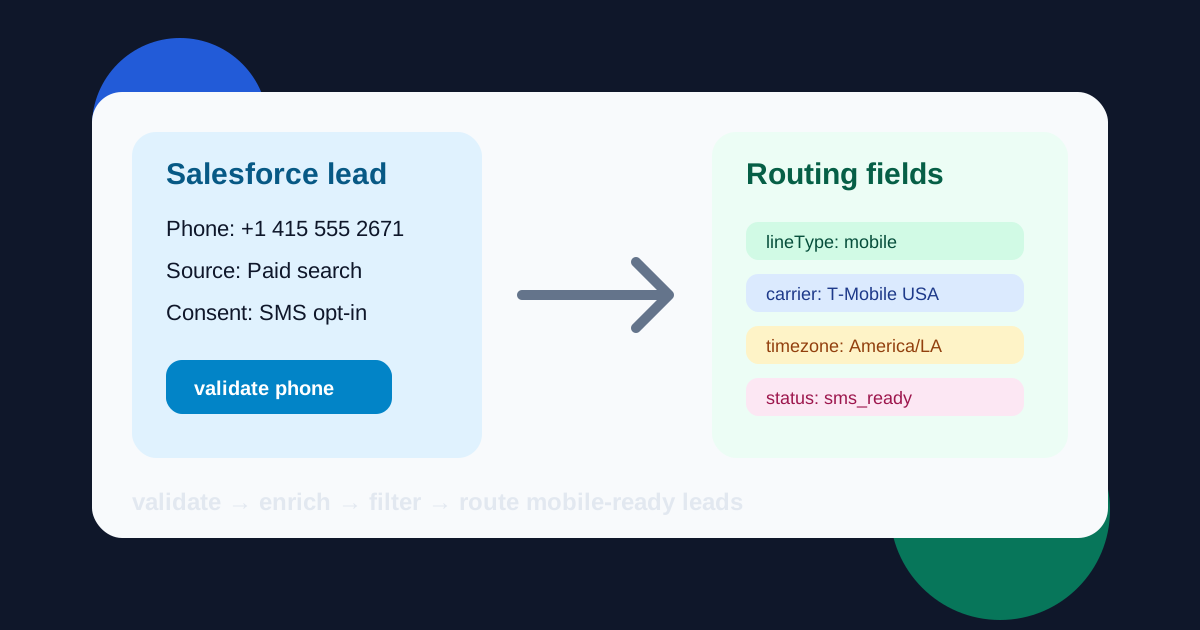
Validate
Normalize and verify the phone number before assignment.
Enrich
Attach carrier, line type, country, geo, and timezone fields.
Filter
Suppress invalid, landline, disposable, and risky VoIP records.
Route
Send mobile-ready prospects to the right SDR or campaign.
Why Salesforce Needs Phone Intelligence, Not Just Phone Formatting
Most CRM hygiene projects start with dedupe rules, required fields, and country formatting. Those steps help, but they do not answer the questions that determine whether a lead should receive a text, a call, a sales task, or a data repair workflow. Can this number receive SMS? Is it a mobile line, landline, VoIP, or toll-free number? Which carrier owns it? What local time is it for the recipient? Should this lead enter a fast-response queue or a slower nurture path?
That is where a phone enrichment API becomes useful for RevOps. Phone-Check.app validates and enriches numbers in less than 50ms on average, with 99.6% validation accuracy across 232 countries. The result can be written to Salesforce as structured fields, not a note buried in activity history. Once the data is structured, routing rules, campaign membership, reports, and automation become more reliable.
The best workflow is simple: validate, enrich, filter, then route. It works for Salesforce web-to-lead forms, custom landing pages, lead vendors, webinar imports, partner referrals, and outbound list uploads. Real-time validation protects high-intent forms. Bulk validation cleans CSV imports before they pollute queues.
Recommended Salesforce Fields
| Field | Purpose | How RevOps uses it |
|---|---|---|
| phoneValidationStatus | Stores valid, invalid, review, or suppressed. | Lead assignment, suppression reports, campaign eligibility |
| phoneLineType | Captures mobile, landline, VoIP, toll-free, or unknown. | Mobile-only SMS queues and non-mobile cleanup lists |
| phoneCarrier | Adds the detected carrier or best available carrier match. | Carrier performance reporting and delivery diagnostics |
| phoneTimezone | Stores the primary timezone from the validation result. | Local-hour routing, SDR task timing, campaign scheduling |
| phoneSuppressionReason | Explains why a lead was excluded from SMS or auto-dialing. | RevOps audits, data repair queues, vendor feedback |
Lead Routing Rules That Sales Teams Actually Use
A validation project fails when it produces data but no workflow change. Start with routing decisions. Valid mobile numbers with recent consent can enter SMS-assisted sales plays. Valid landlines can stay in Salesforce, but they should move to call or email tasks instead of automated SMS campaigns. VoIP numbers can be useful for business accounts, yet non-fixed VoIP and disposable patterns should trigger extra review before high-cost outreach or account creation.
Timezone is the field that often creates the fastest sales lift. Instead of assigning every inbound lead to the next available representative, route by local-hour SLA. A West Coast lead that arrives at 7:30 a.m. Eastern may be better served by a later task or a regional queue. A lead that arrives inside business hours can receive immediate follow-up. Carrier and country fields give managers a second layer for monitoring failed attempts and vendor quality.
Use suppression without deleting useful CRM history
Suppression is not the same as deletion. A landline number attached to a buying committee member still belongs in the account record. The difference is channel eligibility. Store a clear suppression reason, exclude that record from SMS, and prompt the owner to collect a mobile number during the next interaction.
API-Based Salesforce Enrichment Example
type PhoneDetails = {
  valid: boolean;
  number?: string;
  country?: string;
  carrier?: string;
  type?: string;
  isDisposable?: boolean;
  geo?: string;
  timezones?: string[];
};

function getSuppressionReason(details: PhoneDetails) {
  const lineType = details.type?.toLowerCase() ?? 'unknown';

  if (!details.valid) return 'invalid_phone';
  if (lineType === 'landline' || lineType === 'toll_free') return 'not_sms_eligible';
  if (details.isDisposable || lineType.includes('voip')) return 'review_required';
  return 'sms_ready';
}

async function enrichSalesforceLead(phone: string) {
  const url = new URL('https://api.phone-check.app/v1-get-phone-details');
  url.searchParams.set('phone', phone);

  const response = await fetch(url, {
    headers: { 'x-api-key': process.env.phoneCheckApiKey ?? '' },
  });
  const details = (await response.json()) as PhoneDetails;

  return {
    Phone: details.number ?? phone,
    phoneValidationStatus: details.valid ? 'valid' : 'invalid',
    phoneLineType: details.type ?? 'unknown',
    phoneCarrier: details.carrier ?? 'unknown',
    phoneCountry: details.country ?? 'unknown',
    phoneTimezone: details.timezones?.[0] ?? 'unknown',
    phoneSuppressionReason: getSuppressionReason(details),
  };
}
Bulk CSV Cleanup Before Salesforce Imports
Real-time validation is best for high-intent forms. Bulk validation is better for list imports, event scans, partner files, and aged database cleanup. The workflow is straightforward: export or upload multiple CSV files, map the phone column, validate the numbers, then download enriched output and suppression files. Remove invalid and landline rows from SMS audiences before campaign launch, but keep the reason codes for reporting.
This is especially useful for paid acquisition. A list vendor may provide a phone number, but Salesforce should not treat every row as a sales-ready mobile contact. Bulk validation separates mobile-ready prospects from data repair records, VoIP review candidates, and invalid contacts. Sales managers get cleaner queues. Marketing operations gets fewer failed SMS attempts. Finance gets a cleaner view of campaign waste.
Cleaner CRM fields
Normalize numbers and store validation outcomes where reports, flows, and assignment rules can use them.
Better suppression
Remove invalid, landline, disposable, and risky VoIP records from SMS audiences before send costs start.
Sharper sales queues
Give SDRs mobile-ready leads during local business hours and route lower-confidence records to repair.
How to Implement Salesforce Phone Validation
- 1
Capture leads through Salesforce, a landing page, or a web-to-lead endpoint
Keep the original phone, consent source, campaign, country hint, and lead source so validation decisions can be audited later.
- 2
Validate and enrich the phone number
Call Phone-Check.app for validity, E.164 normalization, line type, carrier, disposable status, geography, and timezone before assigning the lead.
- 3
Write structured fields back to Salesforce
Store validation status, normalized phone, line type, carrier, timezone, and suppression reason as searchable lead or contact fields.
- 4
Route records by actionability
Send valid mobile leads to sales or SMS campaigns, push landline and invalid records to data repair, and route VoIP or disposable records to review.
- 5
Revalidate before large campaign exports
Phone data ages. Refresh older records before high-cost SMS, outbound dialer, or account-based campaign pushes.
Salesforce Reporting: Prove the Quality Lift
Add three dashboards after launch. First, a lead quality dashboard that shows validation status by source, campaign, country, and vendor. Second, a sales activity dashboard that compares connect rates for mobile-ready leads versus unknown or suppressed records. Third, a campaign cost dashboard that tracks attempted SMS sends, blocked non-mobile numbers, and invalid rows removed before launch.
These dashboards make phone validation visible to every team involved in revenue. Demand generation sees which campaigns produce reachable contacts. SDR managers see why a queue performs well or poorly. Marketing operations sees which segments should be repaired before the next SMS send. Security and compliance teams see whether disposable and VoIP patterns are increasing.
Turn Salesforce Phone Fields into Routing Signals
Use Phone-Check.app to validate, enrich, filter, and route phone data before your sales team spends time on unreachable contacts or your SMS campaigns spend budget on non-mobile numbers.
FAQ
Does Phone-Check.app require a native Salesforce package?
No. The common pattern is API-based: validate on a landing page, middleware service, workflow automation tool, or scheduled enrichment job, then write fields back to Salesforce through your normal CRM integration path.
Which Salesforce leads should be validated in real time?
Validate paid lead forms, demo requests, high-intent inbound forms, checkout signups, and any workflow that triggers SMS, voice, or fast SDR follow-up. Lower-value imports can run through bulk CSV validation first.
Should landline leads be deleted from Salesforce?
Usually no. Keep the record if the business context is useful, but suppress it from SMS and mobile-first automations. Route it to email, account research, or a phone-data repair task.
How often should CRM phone data be revalidated?
Revalidate before major campaign sends, after new list imports, and when phone fields are older than 30 to 90 days for high-value outreach. Sales teams should refresh stale accounts before dialing sprints.