Landline Remover Integrations: Clean HubSpot, Salesforce, Klaviyo, and CSV Lists Before SMS
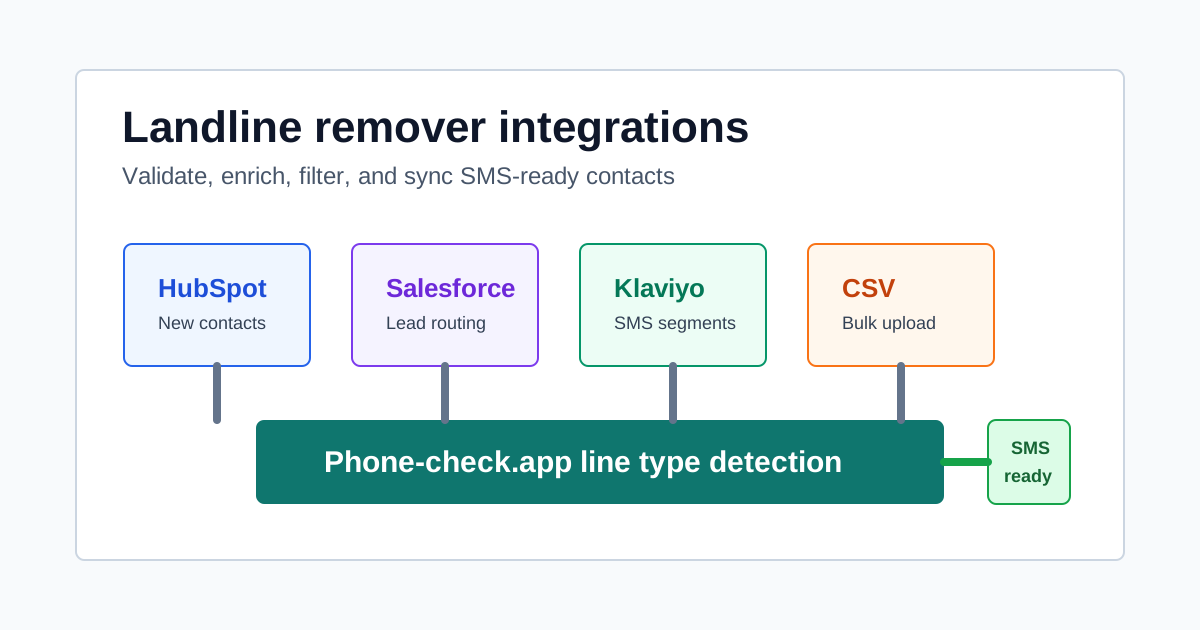
Most SMS waste does not come from one broken tool. It comes from phone numbers entering the marketing stack through too many doors: checkout forms, demo forms, CRM imports, event scans, lead vendors, and campaign CSVs. A landline remover integration works when the same line type policy follows every number everywhere it goes.
SMS cost reduction when landlines and invalid records are filtered.
Countries covered for validation and enrichment.
Export clean mobile rows plus suppressed rows for reporting.
Why Landline Removal Belongs in the Whole Stack
A list cleaner that only runs once a year will miss the bad data created tomorrow. New leads arrive through ads, affiliates, order forms, webinars, sales reps, support tickets, and imports. Some people type the wrong number. Some submit a desk phone. Some use non-fixed VoIP to avoid sales calls or create fake accounts. Some records were valid last year and are now disconnected.
The right integration does not delete every non-mobile record. It labels records so each channel can make a better decision. Mobile numbers can enter SMS campaigns. Landlines can move to voice, email, or direct mail. Invalid and disconnected numbers can be removed from active outreach. High-risk VoIP can trigger review before a promo code, OTP, or checkout confirmation is sent.
Phone-check.app supports both sides of this workflow: real-time API checks for forms and workflows, plus bulk CSV upload for large lists. The same response fields power both paths: validation status, line type, carrier, country, timezone, connectivity, and risk score.
Line Type Rules for SMS Marketing
| Line Type | SMS Fit | Campaign Action |
|---|---|---|
| Mobile | Best fit | Allow for SMS if consent and timezone rules pass. |
| Landline / fixed_line | Do not send | Suppress from SMS. Route to voice, email, or direct mail. |
| Fixed VoIP | Review | Usually suppress from SMS. Consider voice follow-up for B2B contacts. |
| Non-fixed VoIP | High risk | Block or review for OTP, signups, promotions, and order forms. |
| Invalid / disconnected | Do not send | Remove from active sends and export for cleanup. |
Where to Integrate Landline Removal
| Integration | Best For | Fields to Sync |
|---|---|---|
| HubSpot | Real-time lead intake and lifecycle workflows | phone_line_type, phone_carrier, phone_timezone, sms_campaign_action |
| Salesforce | Enterprise lead routing and SDR queues | Phone_Line_Type__c, Phone_Valid__c, Phone_Risk_Score__c |
| Klaviyo | E-commerce SMS campaigns and cart recovery | sms_ready, validation_status, local_timezone, carrier_name |
| Bulk CSV upload | Large one-time campaign files and vendor lists | Clean mobile export plus suppressed landline and invalid rows |
| API webhook | Custom signup, checkout, and order forms | Immediate allow, review, or suppress decision before submission |
Bulk CSV before launch
Upload multiple CSV files from your CRM, SMS platform, event vendor, or affiliate source. Select the phone column, validate in bulk, and export a clean SMS-ready file without landline, invalid, disconnected, or high-risk VoIP rows.
Real-time checks on forms
Validate phone numbers when shoppers, prospects, or new users submit forms. This protects signup forms, order forms, and quote forms from typos, fake numbers, and phone lines that should not trigger SMS spend.
async function enrichContactForSms(phone: string) {
  const response = await fetch('https://api.phone-check.app/v1/validate', {
    method: 'POST',
    headers: {
      Authorization: 'Bearer YOUR_API_KEY',
      'Content-Type': 'application/json',
    },
    body: JSON.stringify({ phone, enrich: true }),
  });

  const data = await response.json();

  if (!data.valid || data.connectivity === 'disconnected') {
    return { sms_campaign_action: 'suppress_invalid', ...data };
  }

  if (data.line_type === 'landline' || data.line_type === 'fixed_line') {
    return { sms_campaign_action: 'route_to_voice', ...data };
  }

  if (data.line_type === 'non_fixed_voip' || data.risk_score >= 70) {
    return { sms_campaign_action: 'manual_review', ...data };
  }

  return { sms_campaign_action: 'sms_ready', ...data };
}
The Export Fields Your Team Needs
The best landline remover integrations create fields that marketers can actually use. A raw API response is useful for developers, but campaign builders need simple properties: sms_ready, phone_line_type, phone_carrier, phone_timezone, phone_validated_at, and sms_campaign_action.
The sms_campaign_action field is the most important. It turns technical data into a clear operating rule. Valid mobile numbers can receive SMS. Landlines route to voice or email. Invalid and disconnected numbers leave the active audience. High-risk VoIP can trigger a fraud review or a stricter OTP path.
Keep suppressed rows in a separate export. That file helps finance calculate cost avoidance, sales teams recover contacts through other channels, and compliance teams explain why certain records were excluded.
Choose the entry points where phone data arrives
Identify every source that creates or imports phone numbers, including forms, HubSpot, Salesforce, Klaviyo, event lists, paid leads, and CSV uploads.
Run phone validation at each entry point
Use a phone validation API or bulk CSV upload to normalize numbers, detect line type, check carrier, and attach country and timezone data.
Create a campaign action field
Store a simple output field such as sms_ready, route_to_voice, suppress_invalid, or review_voip so every tool can apply the same policy.
Sync enriched fields back to the marketing stack
Write line type, carrier, timezone, validation status, risk score, and campaign action into CRM and SMS platform properties.
ROI: The Landline Filter Pays for Itself Fast
The math is simple. A campaign list of 250,000 contacts with 16% landline or invalid records contains 40,000 numbers that should not receive SMS. If each message costs $0.015, the first send wastes $600. A five-touch sequence wastes $3,000 before you count carrier filtering, reporting confusion, or SDR follow-up on bad records.
The bigger win is quality. When SMS campaigns send only to valid mobile numbers, delivery rate can move from the low 70s toward the mid 90s. Replies, clicks, and conversions become easier to interpret because the audience is reachable. Finance sees lower spend. Marketing sees cleaner performance. Sales sees fewer dead contacts.
Bulk validation also creates a defensible baseline. You can show exactly how many landlines were removed, how many invalid numbers were suppressed, how many records moved to review, and how many mobile contacts remained ready for campaign launch.
Example: Klaviyo SMS Segment Before and After
An e-commerce team exports 120,000 contacts from a loyalty program into Klaviyo for a weekend sale. Before validation, the team can only segment by consent, country, and purchase behavior. After validation, it adds four more rules: phone is valid, line type is mobile, connectivity is active, and local timezone is inside the approved send window.
The final SMS audience drops to 93,000 contacts, but the campaign is stronger. Landlines move to an email coupon flow, disconnected numbers leave the active audience, high-risk VoIP records move to review, and mobile contacts receive the offer at the right local hour. The team spends less, avoids unnecessary carrier failures, and can explain exactly why 27,000 records were excluded from SMS.
FAQ: Landline Remover Integrations
What is a landline remover integration?
A landline remover integration checks each phone number, identifies line type, and keeps landline records out of SMS audiences. The integration can run in real time on forms, in a CRM workflow, or through bulk CSV validation before campaign launch.
Can I remove landlines from Klaviyo or HubSpot SMS lists?
Yes. Validate contacts before enrollment, store line type and validation status as custom properties, then build SMS segments that include valid mobile numbers and exclude landline, invalid, disconnected, and high-risk VoIP records.
Should landline records be deleted from the CRM?
No. Keep them for voice, direct mail, email, and data quality reporting. Suppress them from SMS sends, but preserve the record with a clear campaign action field so teams know how to route the contact.
How often should marketing teams run bulk landline removal?
Run bulk validation before every large SMS campaign, after importing new lead lists, and on a monthly or quarterly CRM hygiene schedule. Databases decay over time as numbers disconnect, port, or change subscriber.
Related Workflows
Remove Landlines Before Your Next SMS Send
Upload a CSV, validate a sample contact, or wire the API into your CRM workflow. Keep valid mobile numbers in SMS and route every other line type to the right channel.
Test line type detection